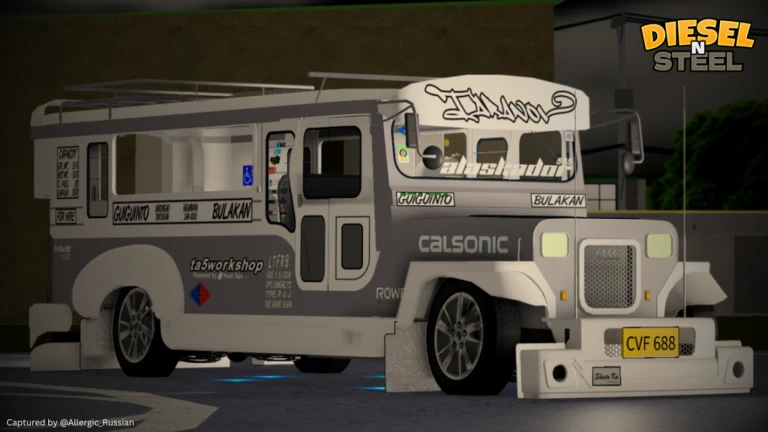
Ready to hit the streets in your iconic Jeepneys? Diesel n’ Steel is a Roblox game that offers you the ultimate Jeepney simulator experience. Here you can customise your Jeepneys with your exclusive touch. You can create your own stickers using your artistic designs and apply them to your Jeeps.
If you have your personal design but wonder how to put it in-game, then we’ve got you covered. Today, we will show you how you can make your own stickers in Diesel n’ Steel.
Diesel n’ Steel: How to Insert Stickers
Follow all the steps given below in chronological order to insert your design stickers in-game and make your jeep cooler:
1. Design your Sticker
You can download any sticker of your choice from the web, or be creative to design your own sticker. You can create any sticker using various editors.
2. Background Remover
Once you have created your own sticker, you can now head over to any website that removes background for free, such as Remove BG. And download the image without a background.
3. Visit Roblox – Creator Dashboard
Now you have to follow the steps given below and add your image (Sticker) to the Roblox platform. Once the image is added, you can use it in-game on your truck. Steps are:
- Open Roblox on your device
- Now head over to the Create Section – Creator Hub will open
- From the left-menus click on the Creations section
- Now select the Development Items
- Click on the Decals section
- Click on Upload Asset and upload the image (without background), enter the name and description if you like
- Scroll below and click on upload
- Now, in the same Decals section, you can see your uploaded image
- In the image, you will see a three-dot (…) menu; click on it
- Now select the Open Asset Details
- A new window will pop up
- In front of your image, again click on the three-dot menu (…)
- Now, click on the Copy Texture ID

Also, check out Diesel n’ Steel Codes (2026)
4. Open Diesel n’ Steel on Roblox
Now that you have uploaded your sticker to Roblox. Follow these steps in-game to put a sticker on your Jeepneys:
- Launch Diesel n’ Steel on your device
- Click on the Play button
- Now, click on the spawn your Jeepsy button
- Click on Attachments
- Select the Stickers tab
- In the Texture ID, paste the code (Texture ID) you copied from above
- Now, click on the Place button
- Place the sticker wherever you like on the Jeepneys
- You can make the size of the sticker big or wide by dragging the size column
- Now, click on the go back button and spawn your Jeepneys
Congratulations, you got yourself a brand new sticker in Diesel n’ Steel! You can share the image texture code with your friends and ask them to follow the same instructions to get the same sticker as yours.
Get more Diesel n’ Steel Stickers
If you want more such stickers in Diesel n’ Steel, then you can join the official Diesel n’ Steel Discord server and check out lots of new stickers. In the Discord community, most of the players create their own stickers and share them in the Sticker section. You can directly copy the texture code given in that section and have cool stickers.
Here are some Texture codes for cool Stickers:
- always midnight – 206036250
- proj itasha – 607235469
- feel it – 607266670
- nekobdsu garage – 607326304
- stay sweet – 607311630
- prevail 1 – 429668547
- prevail 2 – 429668806
- make anime great again – 568170422
- nekobasu white – 568114201
- youdachi – 568170627
- nekobasu black – 568111773
- rem or ram – 568170909
- rough hearts club – 562114277
- psycho style – 559112110
- rough hearts club – 559107369
- hearts – 558633492
- super street – 610369715
- But did you die – 407649918
- midnight rush – 445340353
- project itasha – 445340560
- pancake group – 442487223
- Ray Mercury – 445341901
- eight six – 441926844
- aria – 594161351
- dankzsquad – 445340052
Do let us know in the comments if you have any queries regarding these steps. We’ll answer all your queries as soon as possible. You can also check out our Roblox Guides section to get more such guides. If you are a Roblox fan, then do check out other titles such as Anime Ultra Verse and Jujutsu Seas